Jeu vidéo / UI & outillage

SoulTide

Code, build et Tools d'un jeu UE5 en 1 mois

Unreal Engine 5C++UMG / WBPUIPowerShellCI/CDÉquipe

Le jeu

SoulTide est un jeu Unreal Engine 5.5 qu’on a fait à quatre en un mois. On y incarne Charon, le passeur du Styx, déguisé en médecin de la peste.

Le but : récupérer les âmes égarées dans l’archipel et les ramener chacune sur leur île. Sur la route, des anguilles bloquent certains passages : il faut les calmer en leur donnant du poisson, qu’on pêche soi-même.

La boucle de jeu tient là-dedans : récupérer une âme, naviguer, pêcher, nourrir l’anguille, âme suivante.
Univers et direction artistique

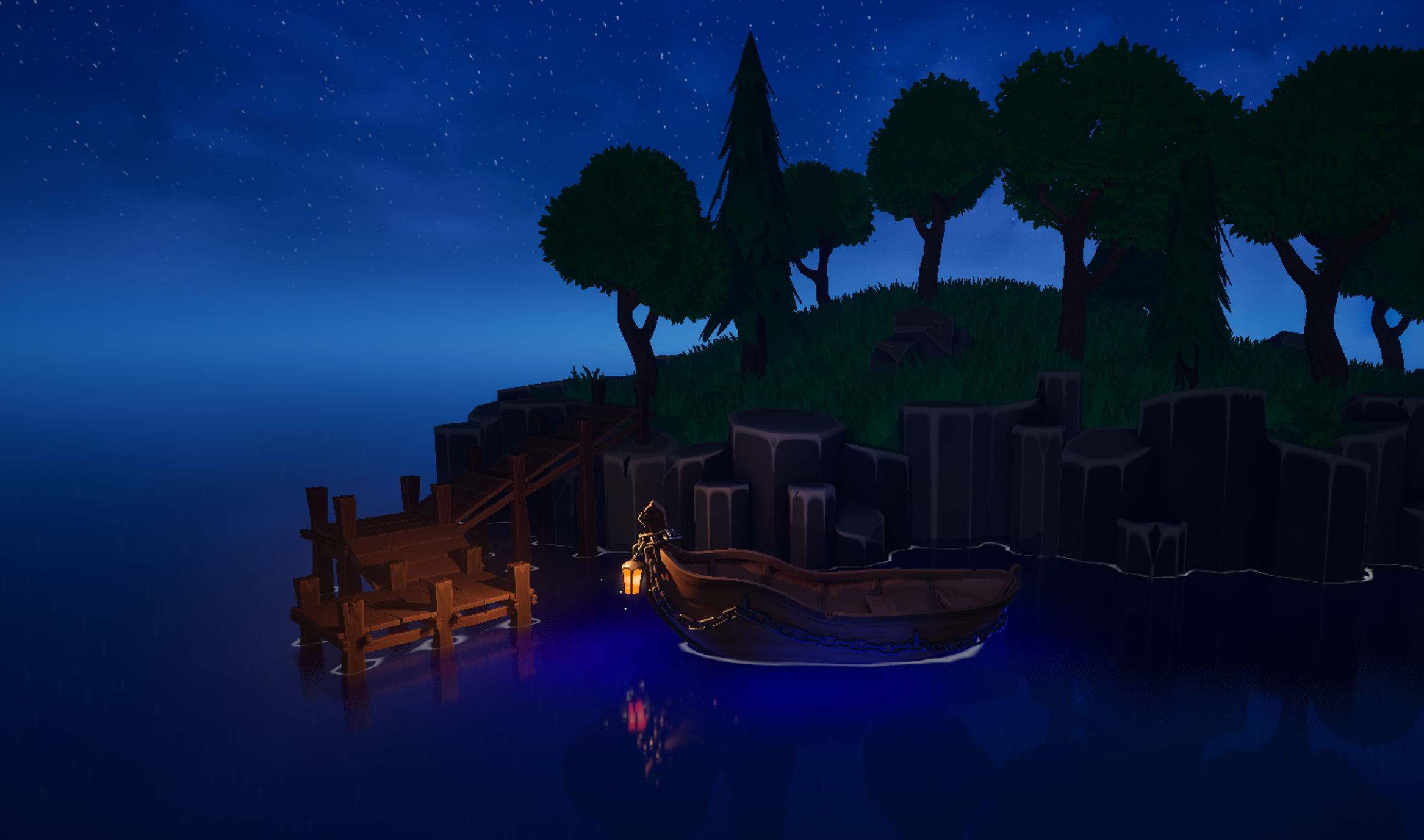
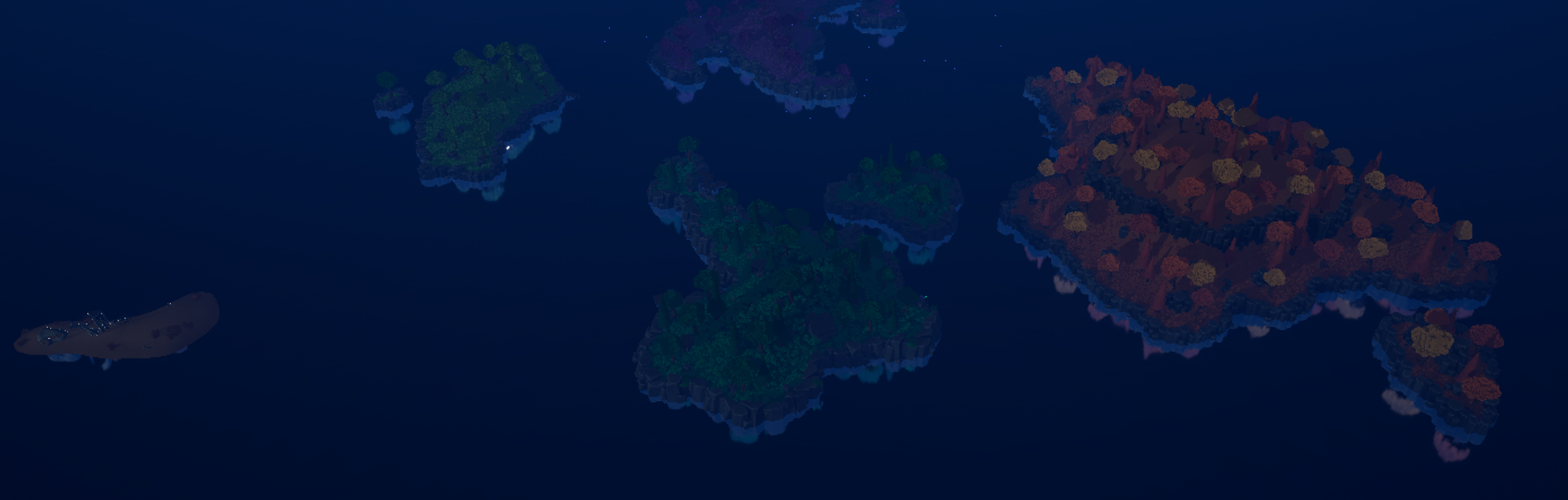
L’univers se découpe en sept archipels, un par péché capital.

  • Orgueil et Paresse : île forestière, phare sur la côte
  • Avarice : ruines, tour encore debout
  • Colère : zone glaciaire, presque iceberg
  • Envie : décor automnal, feuilles qui volent
  • Gourmandise : petite île de sable, squelettes de créatures qui sortent du sol
  • Luxure : zone pluvieuse, saules pleureurs et nénuphars

Les âmes apparaissent comme des silhouettes encapuchonnées, on ne voit que leurs yeux qui brillent. La couleur et la forme indiquent le péché auquel elles sont liées.

La DA est stylisée, dans l’esprit Animal Crossing ou A Short Hike : aplats de couleur, légers gradients, peu de détails fins.
Ma part dans le projet

L’équipe s’occupait surtout de l’art et du game design. Moi j’ai pris toute la couche tech : code, outillage et rig. J’ai livré :

  • la mini-map et la carte plein écran (Widget Blueprint)
  • le système de dialogue, en C++ piloté par DataTable
  • l’UI Manager dans le HUD (SwitchUI, SwitchPopUp, StartDialog) avec chargement asynchrone des widgets
  • les rigs humanoïdes, sortis en urgence à J-2 du livrable
  • le setup d’environnement et les scripts de build pour que les autres puissent compiler sans moi
  • la CI/CD qui publie chaque release sur GitHub automatiquement

Mini-map

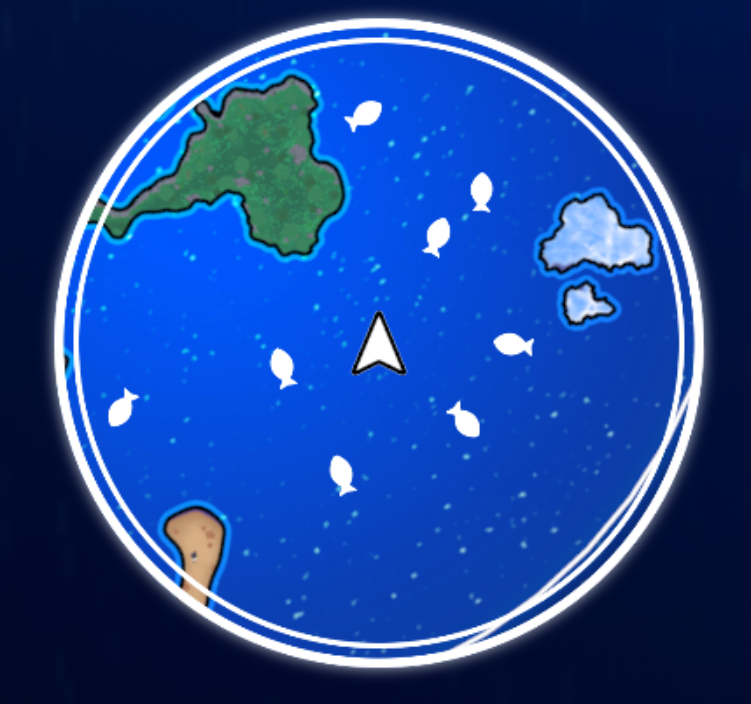
La mini-map est faite en Widget Blueprint, et se décline en deux vues :

  • WBP_MapComponent : le mini-affichage in-game (HUD)
  • WBP_MapMenu : la carte plein écran, raccourci IA_OppenMap

Le rendu utilise la texture de carte T_FinaleMap, projetée via le matériau MI_MapProjection. Un masque circulaire M_MapCircleMask découpe le tout en rond.

Trois icônes sont gérées dynamiquement :

  • WBP_MapIcon-Boat : la position du joueur, orientée selon le cap
  • WBP_MapIcon-Fish : les bancs de poissons repérés
  • WBP_MapIcon-Objectif : la destination de l’âme en cours

Pour la projection, j’ai rendu la map orthographiquement dans Blender, noté le rapport d’échelle, et préparé un PSD pour le graphiste. En runtime, Get Geometry me donne la taille de la minimap en pixels, et je fais un simple calcul linéaire (règle de trois) pour convertir les coordonnées monde en position sur la texture. La map était centrée en [0,0,0].

Quand une cible sort du cercle visible, l’icône est clampée sur le bord : on calcule l’intersection de la droite (joueur vers cible) avec le cercle de la mini-map, et l’icône s’y colle pour rester visible côté joueur, sans jamais déborder du masque.
Système de dialogue (C++ + DataTable)

Le système gère les échanges entre Charon et les âmes qu’il transporte. Il se trouve dans Source/SoulTide/Dialog/ et repose sur UDialogManager, une UCLASS(Blueprintable) dérivée de UObject.

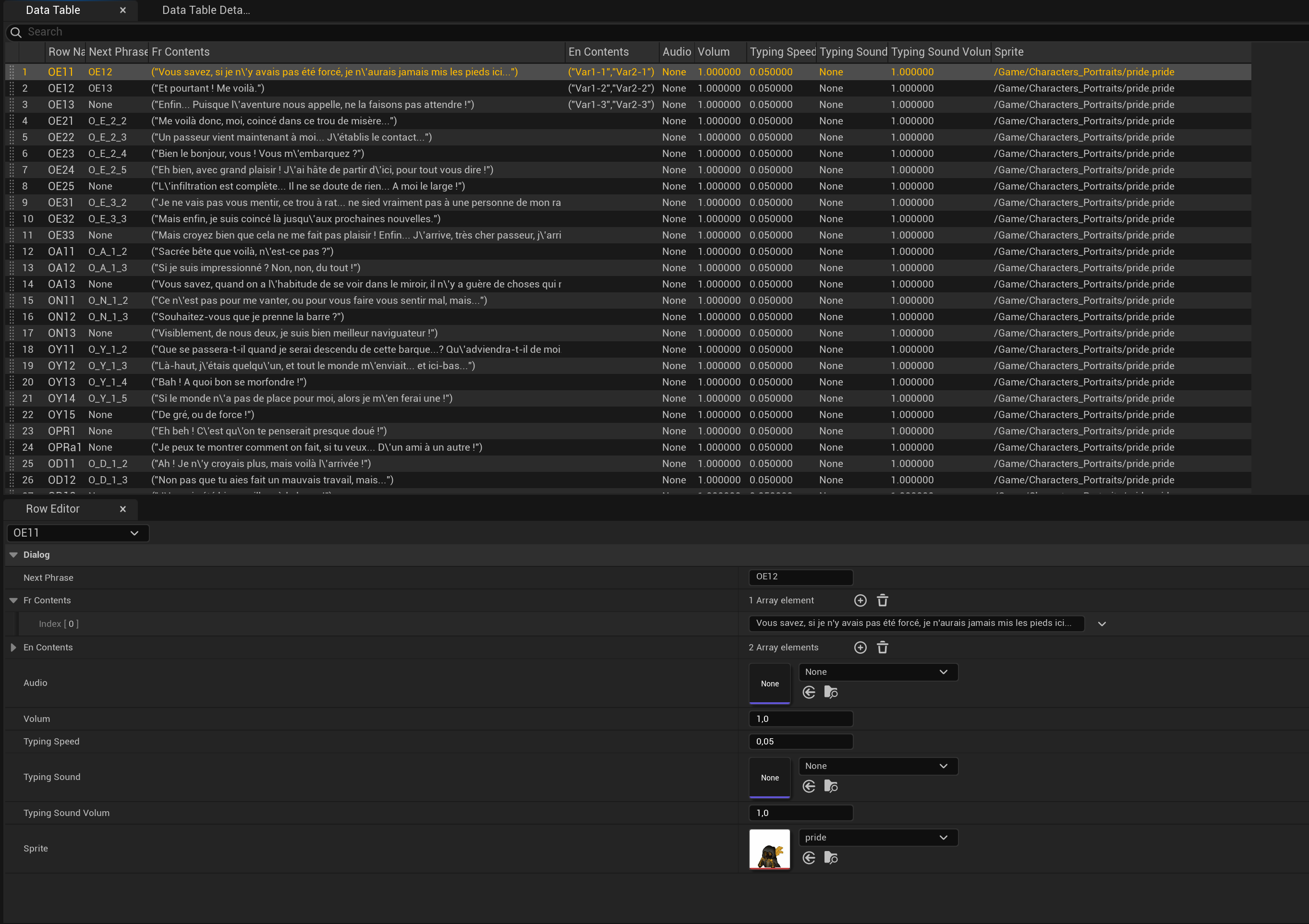
Tout le contenu narratif est stocké dans une UDataTable éditable depuis Unreal. Aucun texte n’est écrit en dur, donc les designers ajoutent ou modifient des répliques sans rebuild.

Une row de la table est typée FDialogPhrase : FTableRowBase et contient :

  • NextPhrase (FName) : chaîne vers la row suivante (NAME_None = fin du dialogue)
  • Fr_Contents / En_Contents (TArray<FString>) : variantes localisées
  • Audio + Volum : voix optionnelle
  • TypingSpeed, TypingSound, TypingSoundVolum : feedback du typing par phrase
  • Sprite : avatar du locuteur

Les assets lourds (sprite, sons) passent par des TSoftObjectPtr<...> et sont chargés à la demande avec LoadSynchronous() au moment où la row s’affiche, pas au démarrage du jeu.

Pour le multilingue, un champ Language sur le manager ("Fr" ou "En") sélectionne la bonne TArray à chaque draw. GetRandomOrSingleText ajoute un peu d’aléatoire quand plusieurs variantes existent dans la même row, donc une âme ne resort pas toujours exactement la même phrase. Côté entrée, StartDialog(TArray<FName>) peut recevoir plusieurs RowNames candidats et en pioche un au hasard.
Interface et animations

Côté UI, le manager ne connaît aucune classe widget en dur. Il parle au HUD et au widget via deux interfaces :

IDialogHUDInterface côté HUD :

  • GetCurrentDialogWidget : récupère le widget actif
  • NotifyDialogClosed : signale la fin du dialogue

IDialogWidgetInterface côté widget :

  • FI_SetTexte, FI_SetSprite : pousse le contenu
  • FI_TextBoxAnimation_IN/OUT : anime la box
  • FI_SpriteSlideAnimation_IN/OUT : anime l’avatar

N’importe quel widget Blueprint peut les implémenter, et les designers retouchent le visuel sans toucher au C++.

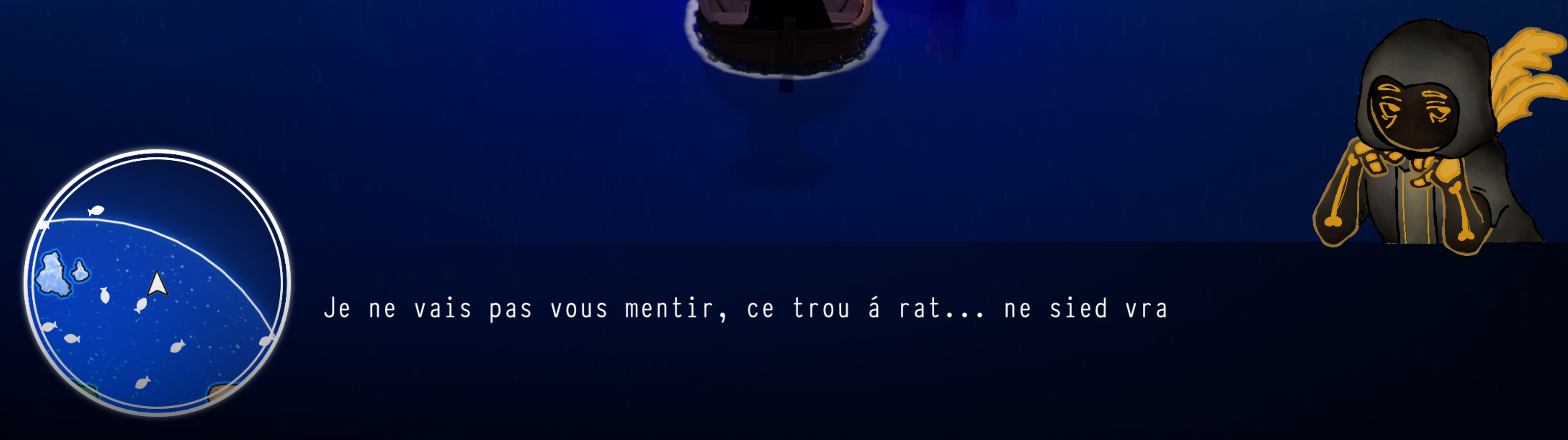
Pour synchroniser animations et typing, j’ai utilisé un pattern ExpectAnimations(N) qui pose un compteur. Les animations Blueprint rappellent le manager via NotifyTextBoxINComplete ou NotifySpriteINComplete (et leurs variantes OUT), qui décrémentent. Quand on arrive à zéro, soit le typing démarre (en IN), soit le dialogue se ferme proprement (en OUT). Aucun texte ne s’affiche donc avant la fin de l’animation d’entrée de la box.

Côté pass et chaining, Pass() saute à l’affichage complet si le typing est en cours, sinon il avance à NextPhrase. Un cooldown de 0.3 s via FTimerManager empêche un double-clic de skipper deux répliques d’un coup. Au passage à la phrase suivante, si la sprite change (Next->Sprite != CurrentSprite), on rejoue l’animation Sprite-IN avant de relancer le typing ; sinon on enchaîne sans coupure visuelle.
UI Manager

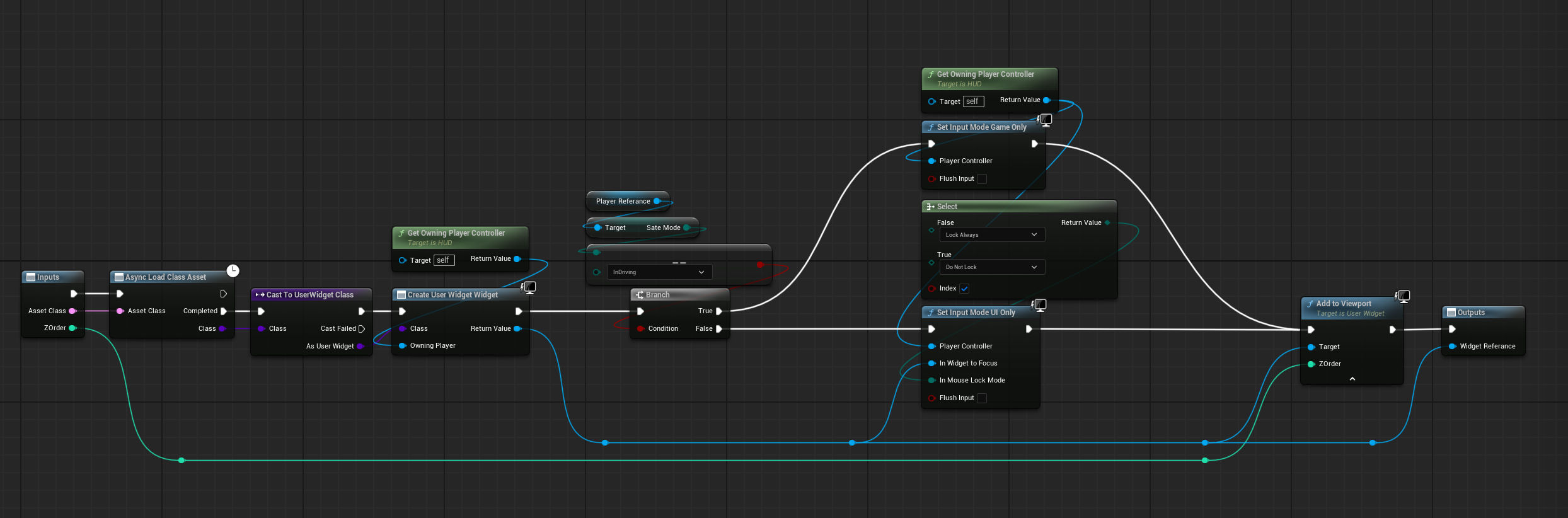
L’UI Manager vit dans le HUD et expose trois fonctions : SwitchUI, SwitchPopUp et StartDialog.

Les classes widget ne sont jamais hard-référencées. Chacune est chargée en asynchrone à la première ouverture et déchargée à sa destruction :

  • aucun coût mémoire au démarrage pour des UI fermées
  • on peut ajouter des mini-jeux ou des modales plus tard sans saturer la mémoire
Outillage de build pour l'équipe

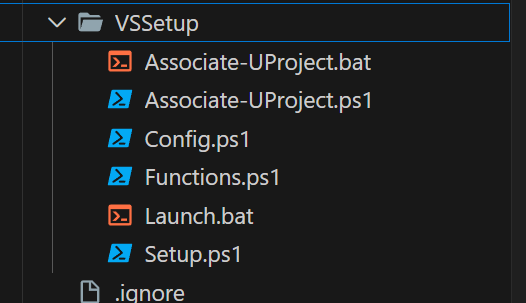
Pour que l’équipe puisse compiler le projet sans avoir à monter à la main toute la chaîne d’outils Unreal, j’ai écrit un setup PowerShell, VSSetup/Setup.ps1.

Sur un poste vierge, il prépare la machine pour builder UE 5.5 :

  • détecte Visual Studio 2022 via vswhere
  • télécharge le bootstrapper VS s’il manque
  • installe les 13 composants requis (Native Game, Unreal Ide, Windows SDKs, MSVC 14.38, etc.)
  • répare le registre VS si besoin
  • installe gh via winget
  • configure core.hooksPath sur .githooks

Au quotidien, des .bat packagés permettent de compiler et packager sans même ouvrir l’éditeur :

  • build.bat : compile
  • live_build.bat : compile avec Live Coding actif
  • package.bat : package final
  • clean.bat : nettoie les binaires

package.ps1 lance la compilation en mode Shipping, récupère uniquement les fichiers nécessaires et sort un zip à distribuer.
CI/CD via githook

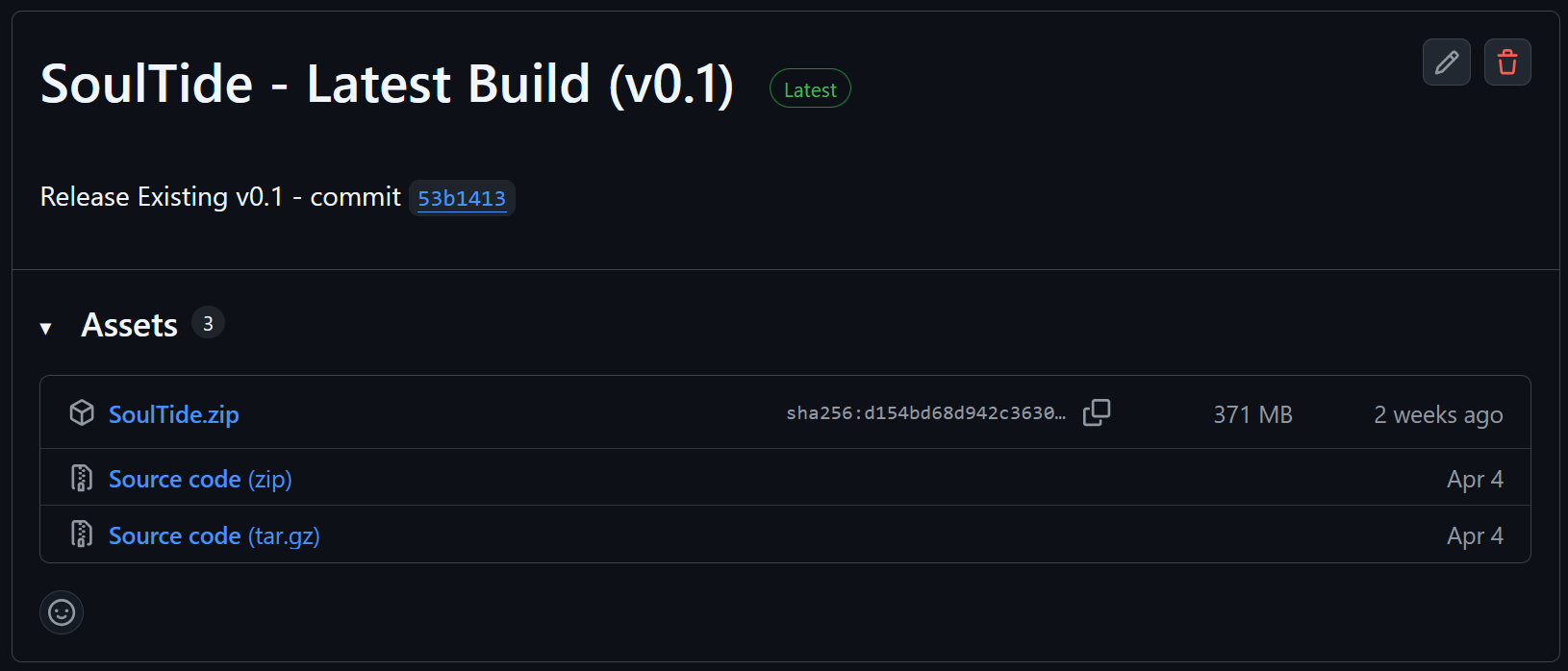
Un hook pre-push PowerShell se déclenche sur la branche release. Il demande un bump de version (Major ou Minor), crée le tag, et publie automatiquement le zip sur GitHub Releases.

Je pousse avec git push origin release et la release versionnée sort, accessible à toute l’équipe et aux joueurs.
Liens

Équipe

Video Game / UI & Tooling

SoulTide

Code, build and Tools for a UE5 game in 1 month

Unreal Engine 5C++UMG / WBPUIPowerShellCI/CDÉquipe

The game

SoulTide is an Unreal Engine 5.5 game we made in one month, four of us on the team. You play Charon, the ferryman of the Styx, dressed up as a plague doctor.

Your job is to gather the lost souls drifting around the archipelago and take each one back to its own island. Eel-like creatures block some of the passages along the way: to calm them down, you have to feed them fish you caught yourself.

The whole loop comes down to: pick up a soul, sail, fish, feed the eel, then on to the next soul.

World and art direction

The world is split into seven themed archipelagos, one per deadly sin.

  • Pride and Sloth: forested island with a lighthouse on the coast
  • Greed: ruins watched over by a tall tower
  • Wrath: cold iceberg zone
  • Envy: autumn area with leaves drifting in the wind
  • Gluttony: small sandy island with bone remains rising out of the ground
  • Lust: rainy zone with weeping willows and lily pads

Souls show up as hooded silhouettes, and pretty much all you see of them are the glowing eyes. The color and shape hint at the sin they’re tied to.

The art direction is stylized, somewhere between Animal Crossing and A Short Hike: flat base colors, soft gradients, not a lot of fine detail.

My part in the project

The rest of the team handled the art and the game design. I took the whole tech layer: code, tooling and rigging. I shipped:

  • the mini-map and the full-screen map (Widget Blueprint)
  • the dialogue system, in C++ driven by a DataTable
  • the UI Manager in the HUD (SwitchUI, SwitchPopUp, StartDialog) with async widget loading
  • the humanoid rigs, done in a rush two days before the deadline
  • the dev environment setup and build scripts so the others could compile without me
  • the CI/CD that auto-publishes every release to GitHub

Mini-map

The mini-map is built in Widget Blueprint, in two views:

  • WBP_MapComponent: the in-game HUD widget
  • WBP_MapMenu: the full-screen map, toggled with IA_OppenMap

It uses the map texture T_FinaleMap, projected through the MI_MapProjection material. A circular mask M_MapCircleMask crops the whole thing into a circle.

Three icons get updated dynamically:

  • WBP_MapIcon-Boat: the player’s position, rotated to match the heading
  • WBP_MapIcon-Fish: spotted fish schools
  • WBP_MapIcon-Objectif: the current soul’s destination

For the projection, I rendered the map orthographically in Blender, noted the scale ratio, and prepared a PSD for the artist. At runtime, Get Geometry gives me the mini-map size in pixels, and a simple linear calculation (rule of three) converts world coordinates to texture position. The map was centered at [0,0,0].

When a target leaves the visible circle, the icon clamps to the edge: we compute the intersection between the (player -> target) line and the mini-map’s circle, and stick the icon there so the player can still tell where to go, without it ever spilling outside the mask.

Dialogue system (C++ + DataTable)

The dialogue system handles the exchanges between Charon and the souls he ferries. It lives in Source/SoulTide/Dialog/ and is built around UDialogManager, a UCLASS(Blueprintable) that derives from UObject.

All the narrative content is stored in a UDataTable you can edit straight from the Unreal editor. Nothing is hardcoded, so designers can add or tweak lines without rebuilding the game.

A row in the table is typed FDialogPhrase : FTableRowBase and carries:

  • NextPhrase (FName): chains to the next row (NAME_None ends the dialogue)
  • Fr_Contents / En_Contents (TArray<FString>): localized variants
  • Audio + Volum: optional voice line
  • TypingSpeed, TypingSound, TypingSoundVolum: per-line typing feedback
  • Sprite: speaker avatar

The heavy stuff (sprite, sounds) is stored as TSoftObjectPtr<...> and only pulled in on demand through LoadSynchronous() when the row is actually shown, instead of being bundled at startup.

For localization, a Language field on the manager ("Fr" or "En") picks the right TArray at draw time. GetRandomOrSingleText adds a bit of randomness when several variants share the same row, so a soul doesn’t always come back with the exact same line. The input side works the same way: StartDialog(TArray<FName>) can take a list of candidate RowNames and picks one at random.

Interface and animations

On the UI side the manager doesn’t know any concrete widget class. It talks to the HUD and the widget through two interfaces:

IDialogHUDInterface on the HUD:

  • GetCurrentDialogWidget: fetches the active widget
  • NotifyDialogClosed: signals the dialogue is done

IDialogWidgetInterface on the widget:

  • FI_SetTexte, FI_SetSprite: push the content
  • FI_TextBoxAnimation_IN/OUT: animate the box
  • FI_SpriteSlideAnimation_IN/OUT: animate the avatar

Any Blueprint widget can implement them, and designers change the visuals without touching the C++.

For the animation and typing sync, I used an ExpectAnimations(N) pattern that sets a counter. The Blueprint animations call back into the manager via NotifyTextBoxINComplete or NotifySpriteINComplete (with their OUT counterparts), which decrement it. Once it hits zero, either the typing kicks off (IN case) or the dialogue closes cleanly (OUT case), so no text appears before the box has finished its entry animation.

For skipping and chaining, Pass() jumps straight to the full text if typing is still running, otherwise it moves on to NextPhrase. A 0.3 s cooldown through FTimerManager makes sure a double-click can’t skip two lines in a row. When advancing, if the sprite has changed (Next->Sprite != CurrentSprite), the Sprite-IN animation plays again before typing restarts; otherwise the manager just keeps going without any visual interruption.

UI Manager

The UI Manager lives in the HUD and exposes three functions: SwitchUI, SwitchPopUp and StartDialog.

Widget classes are never hard-referenced. Each one is loaded asynchronously on first open and unloaded on destruction:

  • no memory cost at startup for closed UIs
  • mini-games or modals can be added later without memory pressure

Build tooling for the team

To let the team compile the project without having to learn the whole Unreal toolchain, I wrote a PowerShell installer, VSSetup/Setup.ps1.

On a fresh machine, it automates everything UE 5.5 needs to build:

  • detects Visual Studio 2022 through vswhere
  • grabs the VS bootstrapper if it’s missing
  • installs the 13 components UE 5.5 needs (Native Game, Unreal Ide, Windows SDKs, MSVC 14.38, etc.)
  • patches up the VS registry when it acts up
  • installs gh through winget
  • points core.hooksPath at .githooks

For day-to-day use, a few .bat files let them compile and ship without ever opening the editor:

  • build.bat: compile
  • live_build.bat: build with Live Coding on
  • package.bat: final package
  • clean.bat: nuke build artifacts

package.ps1 triggers a Shipping build, picks up only the files that matter, and outputs a zip ready to hand out.

CI/CD via Git hook

A PowerShell pre-push hook fires on the release branch. It asks for a version bump (Major or Minor), creates the tag, and automatically publishes the zip to GitHub Releases.

I push with git push origin release and the versioned release goes out, available to the whole team and to players.

Links

Team